In Offision

Problems you recognise Rooms and desks

Peak hour demand

Meetings default to 30- and 60-minute blocks starting on the hour, so demand piles into a few slots while the half-hours either side stay empty — and everyone thinks the building is full.

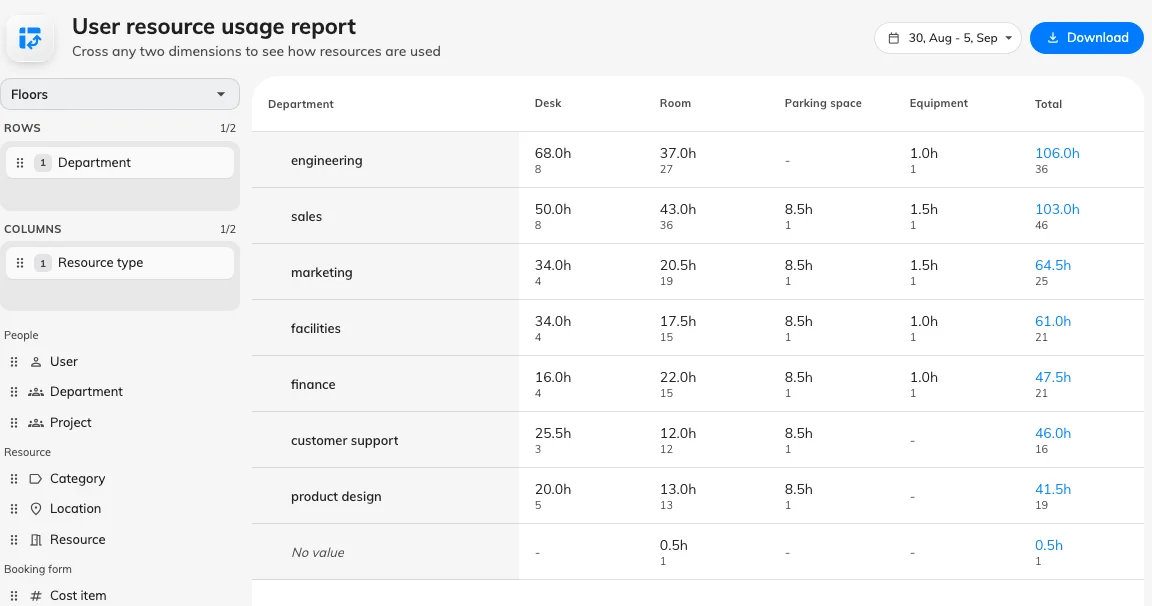
Help Center screenshot: User resource usage report with hours as columns to spot demand clustering on the hour
In Offision

How to read peak-hour utilization

User resource usage in Booking Analytics builds a pivot grid — put Hour of day or Date in columns and Room in rows to see when demand stacks on the hour. Booked hours count scheduled length; compare floors and room sizes before assuming you need more space. A spike at 10:00 with quiet 10:30 slots usually means scheduling habit, not missing rooms.

Read in Help Center: See how much your rooms are used

Common questions

Sometimes it is. Utilization by room, hour and size tells you whether you are short of rooms or short of visibility — measure before you spend on more space.

Help Center screenshot: User resource usage report with hours as columns to spot demand clustering on the hour
Smiling workplace professional in front of an office floor plan schematic
Next step

See it against your own rooms

Walk through your estate, your booking rules and your calendar setup with our team — or start free and try it on one floor.