In Offision

Problems you recognise Rooms and desks

Utilization data

Without check-in data, nobody knows which bookings became real meetings. The same ghost patterns repeat year after year because nothing measures them.

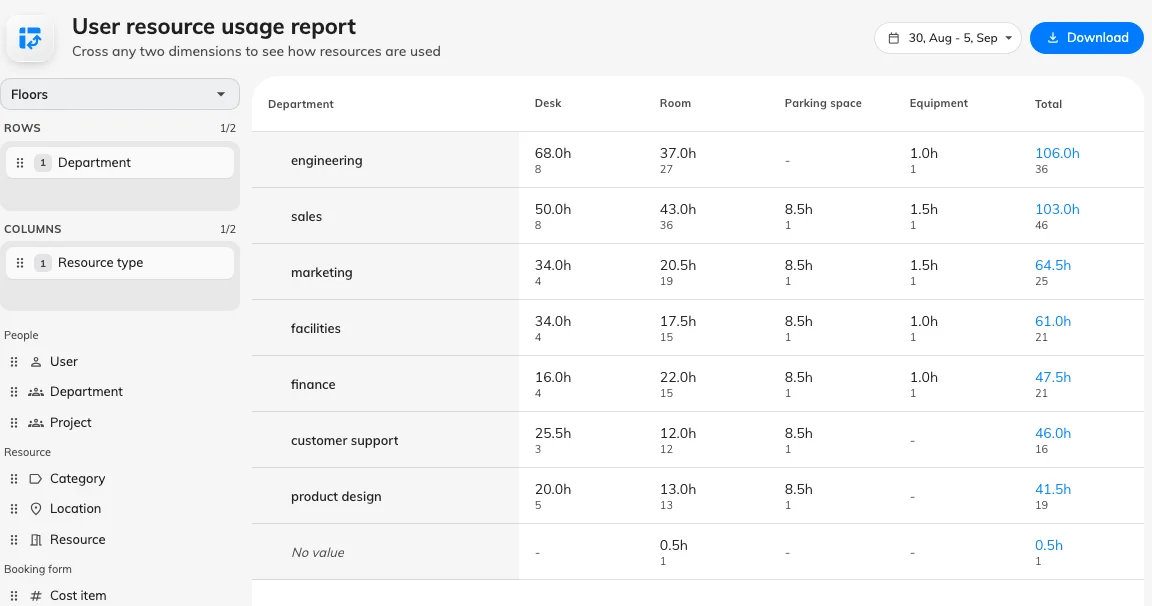
Help Center screenshot: User resource usage report with departments down the side and resource types across the top
In Offision

How utilization reporting works

User resource usage in Booking Analytics builds a pivot grid — drag fields into rows and columns to cross who booked against what they booked. Booked hours count scheduled length per resource; cancelled, rejected and no-show bookings drop out once recorded. Use it to compare booking volume to check-in patterns before tightening policy.

Read in Help Center: See how much your rooms are used

Common questions

Offision Analytics compares booked hours to checked-in hours, so you can size the problem and set rules with numbers behind them.

Help Center screenshot: User resource usage report with departments down the side and resource types across the top
Smiling workplace professional in front of an office floor plan schematic
Next step

See it against your own rooms

Walk through your estate, your booking rules and your calendar setup with our team — or start free and try it on one floor.